
Dashboard
The server at a glance: CPU, memory, disk and accounts, every service's state, attacks blocked today, pending updates, the last backup, and what happened recently.
A tour of the EasyCP hosting control panel for AlmaLinux and CloudLinux. Every screenshot is the real panel with example data, made again with each release, so what you see here is what you get.
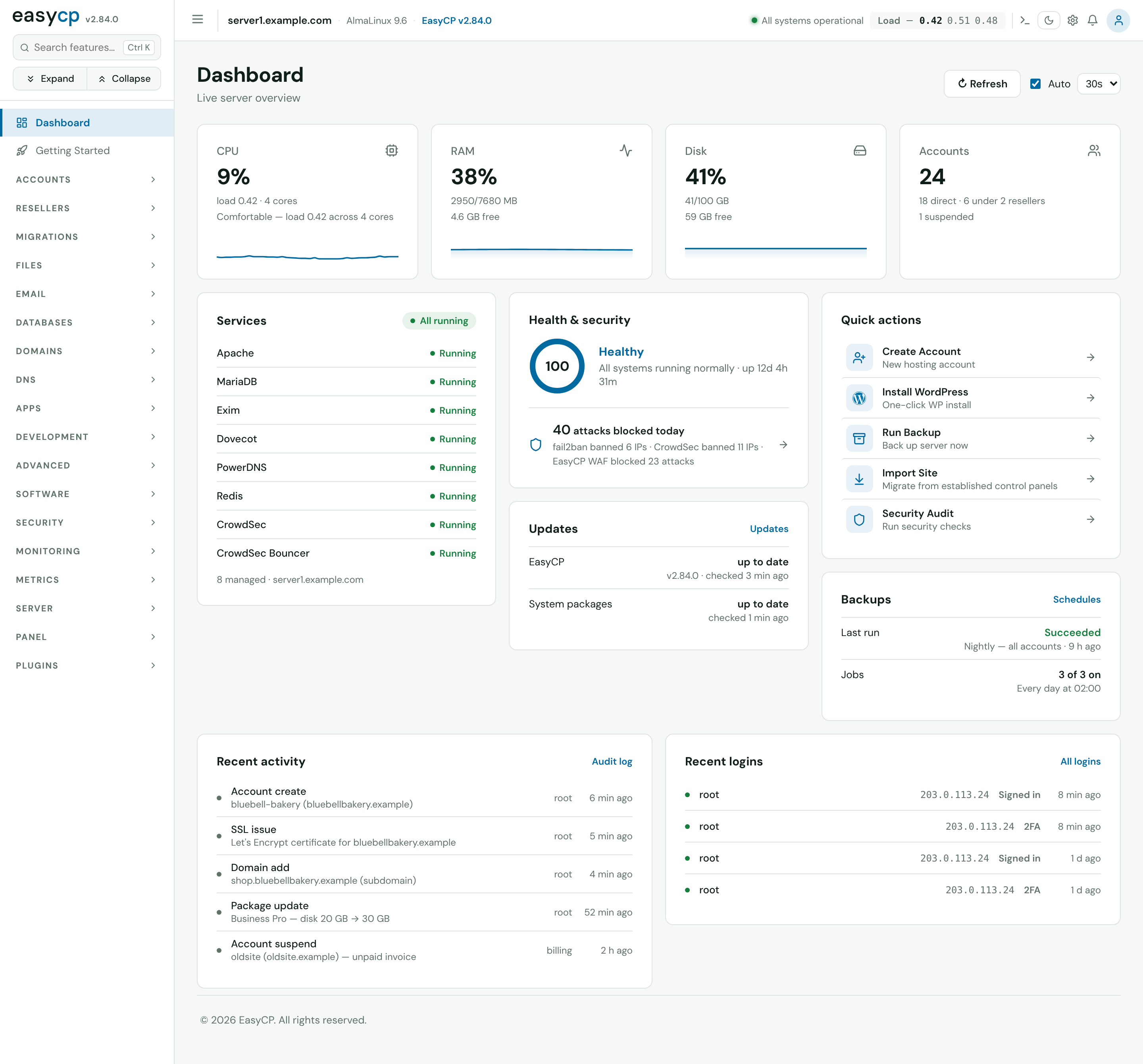
The server at a glance: CPU, memory, disk and accounts, every service's state, attacks blocked today, pending updates, the last backup, and what happened recently.
A customer's own home: every tool grouped as Files, Email, Databases, Domains, DNS and Apps, their account details, and their disk use against their plan.
Every customer can manage files over SFTP with its hosting password or a key; customers whose package includes shell access also sign in over SSH, scp or rsync. The page shows the exact command to use.
The FTP Accounts page starts with the account's SFTP details: host, port, username and how to sign in. Plain FTP is off on a new server, and the page says so.
Every hosting account on the server, searchable and sortable, with its package, disk quota, owner and status. Suspended accounts stand out in red.
A package sets what an account gets: disk, bandwidth, and how many subdomains, databases, mailboxes and FTP logins, plus which PHP versions it may use.
Resellers sell hosting from your server under their own name. Each has a cap on accounts and on total disk, and you decide what they are permitted to do.
A customer's scheduled tasks, each with when it last ran, its exit code and how long it took.
Primary, addon, subdomain and alias domains in one list, with each domain's document root, PHP version, HTTPS redirect, www handling, XML-RPC blocking and certificate.
Every domain with its certificate and expiry date. Certificates renew by themselves; Renew and Repair are there for the one that needs a hand.
Each domain's DNS zone, held on this server or at Cloudflare. Records opens the zone to add, edit or remove records.
Mailboxes with their size limits, forwarders, and what happens to mail sent to an address that does not exist.
For every domain: whether MX, SPF, DKIM, DMARC and reverse DNS are in place, read from public DNS, with the server's own hostname checked at the top.
Every database on the server matched to the account that owns it, with its size and the database users that can reach it.
What ran in the last day, how much space the backups use on this server and on remote storage, and each account's last backup.
Every WordPress site on the server in one place: core, plugin and theme updates (one site or all at once), health checks, cache, maintenance mode, security auto-updates and XML-RPC blocking.
Everything is closed unless it is listed. Open a port or a range to everyone, or only to the addresses you name, with a note saying what it is for.
One list of addresses that are never banned or rate limited: not by the firewall, Fail2Ban or CrowdSec, and not by the panel's login limit.
The server's name, nameservers and certificate checks in one place, with the one switch for FTP: off by default, encrypted when on.
Choose the web server per server: Apache, Apache with Nginx in front, OpenLiteSpeed, or LiteSpeed Enterprise. Switching rewrites every site's configuration for you.
Every account's peak CPU, memory, disk I/O, IOPS, PHP workers and processes against its package limits, with the accounts that hit a limit first. Open any account to see what was running at the time.
Every package the panel depends on, checked against AlmaLinux's updates and published security issues, with automatic security updates daily and hourly.
Every service the server runs with its state, and Restart and Stop for each.
On the first start of a new version the panel makes a throwaway account and checks what a customer would see: the site, a certificate, a mailbox, cron, SFTP, a database, a backup and restores. Then it removes the account.
Who did what and from which address: sign-ins, accounts created or suspended, certificates issued, packages changed.
Manage web servers, nameservers and a backup server from one EasyCP: their load, disk, accounts, version and uptime at a glance, new servers added with an approval step, and shared nameservers across them.
On the server that manages your other servers, the Accounts page lists every account on every server, with the server it lives on, its package and whether its DNS records are published.
Three ways to bring accounts over: upload a backup from another control panel, connect to the old server and move the accounts you pick, or move a single account with just its own login.


